
First impressions
You might think that any app that revolves around numbers is going to be boring, boring, boring. I wouldn’t say that the Numbers app is a barrel of laughs, but it is an extremely useful tool, particularly if you’re budgeting your money, saving for a trip, putting together a business plan, or doing anything that requires the accurate addition, subtraction, multiplication and division of numbers.
I have used Excel to monitor my money for years. I’m not saying that has necessarily curtailed my spending habits, but it has shown me in black and white how buying that inflatable movie screen wasn’t really a great idea, and how I probably could have retired by now if I had made some smarter choices.
As I now use my iPad at home more than I do my PC laptop, I decided to download Numbers. Of course once I’d bought it, I entered the purchase into my spreadsheet…in Numbers.
I think I just blew my mind.
How it works
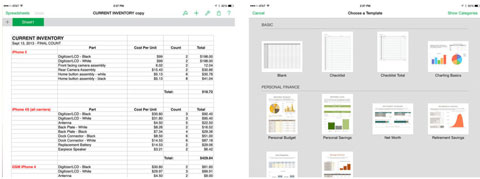
Numbers works much the same way as Excel does, but it takes a little getting used to. You have to double-tap cells to edit them, and then utilize the symbols on the left hand side. They are pretty self-explanatory, but if you’re familiar with Excel, this is just a bit different.
From left to right, you can choose the numbers icon, which will bring up the appropriate keyboard, followed by date and time, text, and finally the “=” symbol, so you can create formulas.
You can also highlight a cell by tapping on it, bringing up a separate pop-up menu that covers familiar options like “cut,” “copy” and “paste,” along with “delete,” “fill” and “comment.”
Along the top of your spreadsheet are tabs that allow you to add worksheets within the same spreadsheet, format your data and create graphs, set passwords, print, change your settings, and email your work.
Just like the Pages app, the App Store’s alternative to Microsoft Word, the Numbers app automatically saves as you go. It assigns each spreadsheet a default name, and when you want to change it, you simply tap on the “Spreadsheets” option in the top left, which takes you to all the spreadsheets you have created, and tap and hold the title. It will then allow you to rename it.
When I used it
I emailed my Excel spreadsheets to myself, and then opened them in Numbers. It took a while to get used to the app on my iPad, rather than on a computer with a keyboard, but once I stopped deleting things by mistake and giving myself way too much money (I was so happy for that five minutes before I realized), it became a breeze.
I don’t use Numbers to its full extent by any means (I’m not sure I want to see a summary of what I’ve spent over the years), but it’s nice to know that it has that flexibility when I need it.
Final thoughts
Again, an app about numbers may not seem terribly exciting, but budgets and the like are a necessary evil in this world, so you might as well have the tools to manage them. The Numbers app is a great tool, and for a very reasonable price. When you consider what the Microsoft Office Suite costs, you’re getting good bang for your buck here.
Pros:
Great price for the functionality. Can convert both ways with Excel.
Cons:
Seeing very clearly that you need to stop spending money.
- Numbers Cost: $9.99
- Seller: Apple
- Devices: iOS
- Rating: E for Everyone


Related Videos