
First impressions
We recently remembered our trip to Europe that we took with a good friend a number of years ago, and specifically recalled our minimal grasp of French as we made our way through Paris. Although we studied Spanish for a bit in high school, we had never become fluent in any language beyond English, and that vacation reminded us how important it is to have at least a basic knowledge of a foreign tongue.
Rosetta Stone software has become one of the most popular advertised methods of learning a second language beyond going to school, and it ain’t usually cheap. Now there is a Rosetta Course app that allows would-be world travelers to try out their language chops without committing to a lot of moolah. We had to give it a try.
How it works
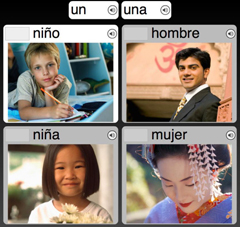
You have to set up an account, and then it’s time to start a series of lessons. Rosetta Course teaches with a combination of words, pictures and audio. Pictures of various people and scenes come up, and then the narrators pronounce the words describing them.
As you go along, you’ll get a chance to practice your phrases using an external or built-in microphone through your device.
There are also portions where they give you the phrase, and you have to match it to the pictures, indicating that you’re getting a grasp of what they’re trying to teach you.
The lessons are split into many phases, including vocabulary and pronunciation, and familiar themes and words will begin to appear, reinforcing the stuff you’ve already learned.
At the end of each phase, you’ll get a score with a percentage of how many you got correct. You can then choose to repeat that phase, or move on to the next one.
One of the most important things to do is concentrate while you are taking the lessons, as they will keep moving the pictures around to make sure you’re paying attention. Any distractions might mean a wrong answer.
When you’ve gone through all the elements of Lesson One, you can purchase access to carry on through the others.
When we tried it
We have always prided ourself on our pronunciation, even if we haven’t known what the heck we’re saying, and our built-in microphone in our iPad seemed to work a treat.
It wasn’t long before we were picking out “fille” and “homme” like a champion, and recognizing when they were swimming, running, eating and drinking. If we flew back to Paris right now, and headed to a sports event near a pool with a bar and restaurant, we’d blend in like a local.
We were whizzing through these lessons, and only made a couple of mistakes when, honestly, we were a bit cocky and not giving the app our undivided attention.
By the time we got to the end of Lesson One, we reckoned that we might be very interested in purchasing access for the full version. This seemed like the kind of course that would work for us.
Final thoughts
This is an excellent introduction to Rosetta Stone. For those who have seen it advertised on television, and wondered what it was all about, they’ll be able to try it enough to decide whether or not it is a language learning system that will work for them.
Rosetta Stone is expensive software, but it certainly has a number of great reviews to recommend it. This app is completely free to try, so you don’t really have anything to lose. Download it and give it a go. Au revoir!
- Pros: Free. Easy to use. Long enough to give good introduction to the full version.
- Cons: The full package is not cheap.
- Cost: Free (for the trial lesson)
- Seller: Rosetta Stone Ltd.
- Devices: iOS and Android

Related Videos