
First impressions
If you’re a fan of our “App of the Week” column (of course you are) you’ll know that we’re absolutely addicted to “The Room” and “The Room Two” – games full of puzzles and mysteries that have to be solved in order for the player to advance through several rooms. We loved them so much that we went through them far too quickly, and were left searching for something to take their place.
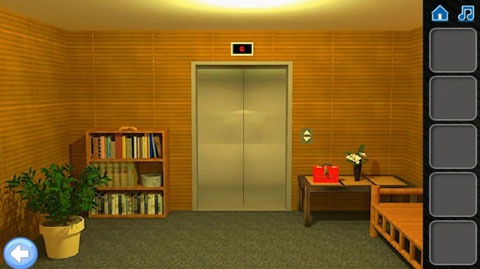
“Can You Escape” is a less sophisticated, but nonetheless very absorbing app of a similar color. It presents you with rooms that hide objects which must be discovered and utilized properly to ultimately open central elevator doors, taking you up through the levels.
This app was actually recommended to us by a friend, who could see that we were pining for “The Room” versions 1 and 2. In the very beginning, we turned up our nose a little, but after getting through Level 1, we were officially hooked.
How it works
You are presented with a simple room furnished with a couch, a bookcase, a lamp, a painting, and a few other bits and bobs. You might be forgiven for pondering why such an uninspired space featuring such basic pieces warrants its very own elevator, but that will be a fleeting ponder as you begin to look for clues. Any hidden items you find should be tapped upon, and they’ll suddenly appear in your inventory bar on the right hand side of the screen.
This app gives you very little instruction, so if you’re familiar with its design, you’ll have an advantage from the git-go. You can go to the settings tab and choose “Instructions,” but it will only tell you that the purpose of the game is to break out of the rooms, solve the puzzles and find all the hidden objects. There is no tutorial, or sample walk-through.
That being said, you can purchase a walk-through of each level for $0.99, but give it a try first (a real try) and if you honestly get stumped, you can just go to YouTube and find a walk-through for free. You should really only need to see one in order to get a grasp of how the app works.
Another good reason to use YouTube is to avoid what appears to be a bug in this app. When we took a look at the “Walkthrough” menu, it immediately asked for our iTunes password, and then asked if we wanted to spend the $0.99 to unlock a walk-through of one of the levels. We chose to cancel the purchase, but it kept coming up, asking for that pesky password again. In the end, we had to come out of the app completely and go back in to stop the barrage of requests.
As with so many other games, the rooms become more complicated as you move through the levels. In the beginning, you only have one room with which to contend, but by the time you’re getting to levels 7 and 8, there will be two to visit, and you’ll have to use objects from one to unlock items in the other.
Much like “The Room,” “Can You Escape” will not zoom in on anything that doesn’t have value – that’s a good thing and will limit your frustration. You’ll be tapping away to see what you can find, but if you tap on an object and it doesn’t bring you in for a closer look, it means it is merely there for decorative purposes.
Once you finish Level 8, it will tell you that there are more levels coming, but you can unlock (i.e. purchase) levels 9 and 10 if you wish. You will also be invited to try more games by the same seller, including the simply rearranged title: “Escape If You Can.” Checking the App Store, you’ll see that “Can You Escape 2” is available as well.
When we played
It took a bit of time to get used to the differences between this app and “The Room,” as the latter has more advanced graphics and moving parts, whereas “Can You Escape” is much less lavish. It also seems to have a few little bugs and misspellings, including issues with in-app purchases, and reverting back to a level that you’ve already completed.
For example, we had finished Level 6 and had advanced to Level 7, yet when we went back in, it took us to the start of Level 6, so we had to go through everything again to move on. This happened twice, so clearly it wasn’t our mistake.
We really enjoyed solving the puzzles, but did find some of the issues mildly irritating, particularly when we chose to pay $0.99 to remove the ads from its sister app “Escape If You Can,” yet despite a successful purchase, they kept coming up.
Final thoughts
If you’re a fan of “The Room” series, you’ll enjoy this app, but it does need to be tweaked a bit to make it work properly. It moves along at quick pace, and if you’re a puzzle lover, you’ll probably be able to ignore the problems it has because it is fun to play.
Hopefully the creator will release updates to sort out the hiccups.
Pros: Free. Good puzzles. Simple layouts.
Cons: Some definite bugs. Lack of instruction might frustrate some.
Cost: Free ($0.99 for ad-free version)
Seller: Kaarel Kirsipuu
Devices: Android and iOS
Rating: E for Everyone
Two and half stars


Related Videos