
First impressions
There are very few of us who do not know the story of “Alice in Wonderland” written by the famous author, Lewis Carroll. In fact, Lewis Carroll was actually the pen name of Rev. Charles Lutwidge Dodgson, a mathematician at Christ Church College, Oxford. Mathematicians have said that “Alice in Wonderland” and “Through the Looking Glass” are filled with references to that logical subject; an ironic theory, as so much in the books seems completely illogical.
Anyway, all that numbers stuff aside, “Alice in Wonderland” has been a best-seller for decades, and loved by children and adults alike. It has been made into a Disney animated film, and numerous live action films over the years, featuring those familiar characters we’ve all come to know so well: the Mad Hatter, Alice, the Cheshire Cat, the Caterpillar…and of course let’s not forget the White Rabbit and Queen of Hearts.
Despite the fact that technology can pull children away from reading books to play games and “OMG” each other instead, there are some apps that actually encourage reading. One such example is “The Alice App” by Emmanuel Paletz. Why did I consider downloading this particular app? Because my ex-boyfriend and voice-over professional, Mike Orenstein, provides the narration. Yeah, we’re still friends.
I ponied up the $4.99 and fell down the rabbit hole.
How it works
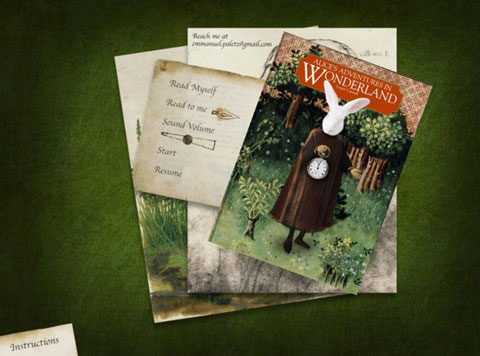
When you first tap on the app icon on your screen, it will take you to the front cover of the book, and a few options, such as “Read Myself,” “Read to me,” “Sound Volume,” “Start,” and “Resume.” You’ll also see a paper with “Instructions” on it in the bottom left-hand corner, which is well worth a look. It will explain that there are a number of animations throughout the pages, making the book quite interactive, and how to activate them.
Once you tap on the cover, it will take you to the credits page, and then you can swipe the screen to start the introduction. Note that even if you have chosen for the app to read to you, you’re on your own reading the introduction. I suspect that’s because this part would only really appeal to teenagers and adults, who no doubt would have no problems reading it themselves.
It’s worth taking the time to go through it, as it reveals the story behind Alice in Wonderland, and how Dodgson (Carroll) was inspired to write the world-famous book. There is also a biography on the man himself, and information about the app’s designer, Emmanuel Paletz.
The first two pages after the introduction are where the narration properly begins, starting with the poem “All in the golden afternoon,” and then we’re into chapter one: “Down the Rabbit Hole.” Look closely at the pocket watch on the left-hand side. Something seems to be moving…
From there you’ll move through the book, with the narrator bringing the story to life as you tap images and pictures to see what they might reveal. Paletz took this world of fantastical characters, and over four years, crafted “beautifully detailed paintings inspired by the Renaissance to tell the tale of Alice’s Adventures,” as noted in the iTunes App Store description.
It certainly is a beautiful app, with lots of little surprises to uncover. For example, when faced with the interior of the rabbit hole, you’ll suddenly see Alice and a number of accompanying objects falling down before your eyes.
She will grow and shrink depending on what she consumes, encounter interesting creatures, and generally make her way through Wonderland while trying (usually unsuccessfully) to stay out of trouble. I need to call the Cheshire Cat’s dentist. Those are some white chompers.
When I tried it
Once I moved past the bizarre experience of hearing an ex-boyfriend’s voice reading Alice in Wonderland to me, I got into the story for a while, and then swiped ahead, like an impatient Alice, to see what pictures and animations the rest of the book had in store. I will say that someone needs to go in and remove about half of the apostrophes in the text. Looks like someone went a bit doolally with a search-and-replace function or similar at one point, sticking in extra apostrophes hither and yon. I doubt Charles Dodgson would be amused. Not mathematical at all.
I also found a few of the pages difficult to swipe. At the time I thought perhaps it was a dirty screen on my iPad, or maybe I wasn’t swiping correctly, but after testing a number of times, there were definitely specific pages that gave me trouble. For example, page 77 seems REALLY reluctant to turn, and every time I tried and failed, I’d get the first sentence of page 76 coming through over, and over, and over, and over, and over again. Maybe I needed to get advice from that caterpillar…
I really liked the artwork, and I’ve got to hand it to Orenstein, he does a great job of narrating the story, different voices and all.
Final thoughts
There are a few small bugs that need to be worked out in this one, and someone needs to go in with an apostrophe vacuum tout de suite, but overall it’s a unique way to enjoy this timeless story. I would be surprised if your children don’t get swept up in the magic of Wonderland when you sit down and enjoy The Alice App together.
- The Alice App
- Cost: $4.99
- Seller: Emmanuel Paletz, Corp.
- Devices: iPad
- Rating: E for Everyone
- Three stars
Pros: Beautiful design. Option to read yourself or use the narrator. Nice animations.
Cons: It’s got some bugs. Bit more expensive than some. Those apostrophes.

Related Videos