
First impressions
The younger generation may not know this, but back in the day, just after the dinosaurs, there were things called “typewriters” that roamed the earth, announcing their presence with clipped “tick-tick-tick-tick-tick” sounds, followed by a very satisfying return noise and a “ding!” as the writer moved on to the next line.
These have long been replaced by computers, tablets, and a number of other devices that are very efficient, absolutely get the job done, but don’t really offer that tactile sensation that a typewriter gives.
Authors and writers of a certain age may have moved on to the new technology, but many have a sense of nostalgia when it comes to the noble typewriter. Who knew that Tom Hanks, celebrity superstar and lead in the film “You’ve Got Mail,” was a closet typewriter aficionado? Well, the cat’s out of the bag with the “Hanx Writer” app – a shout out to a time when a typing machine with heft was considered a treasured item by its owner, either used for writing, or wielded as a significant weapon in a murder mystery. This app allows you to revisit (or discover for the first time) the thrill of using a typewriter on your iPad. The simulated clickety-clickety sounds, plus the familiar type of a bygone era, will no doubt inspire budding authors to reach deep and find new inspiration for that book they know they’ve got inside them.
I know I have a book somewhere inside me too, but what discipline it will actually take for me to write it is a whole ‘nother tale. I tried a few typewriters when I was younger, but I tended to get my fingers jammed between the keys, so my bruised digits and I waited until computers came into being. Maybe this would give me all the audio satisfaction I craved without the pain.
Free app = why not download? So I did.
How it works
This may seem like a somewhat unnecessary part of the review, as you would think that anyone who knows how to use a keyboard could simply start typing away on Hanx. Yes, and no.
The basic app is free, but there are options you can purchase if you want to enhance your typewriting experience, along with a number of settings to change. The cog icon in the top left-hand corner takes you to a drop-down menu with the choice of turning the “Animation,” “Sound,” “Modern Delete,” and “Show Cursor” on or off. The “Modern Delete” is one of the more interesting options, as if you turn that off and hit the delete key, you’ll get ye olde fashioned “x” through the letter you’re deleting, instead of erasing it. Remember those days? Before the smell of that hallucinogen “Liquid Paper” was thick in the air?
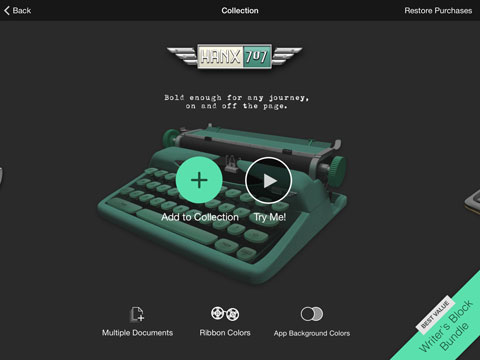
The option on the bottom of that drop-down – “Add Background Colors” – has a shopping cart next to it, as do other selections elsewhere. These, of course, indicate that there is a monetary value attached to choosing them. The same applies to the typewriter icon next to the settings cog. Your default typewriter is the “Hanx Prime Select,” but you can buy the “Hanx 707” and the “Hanx Golden Touch” for ready cash to expand your horizons. My advice would be to go with the “Writer’s Block Bundle” that gives you everything in one package. Sure, you could purchase piecemeal, but when you consider that one option costs you $2.99, and the bundle costs $4.99, it just makes sense to purchase the latter, doesn’t it?
For said bundle, the world of multiple documents, text alignment, title page and picture, ribbon colors and background colors will suddenly be available to you. The nice thing about the Hanx app is that it will let you try before you buy, so you can sample the options before you commit the moolah.
The rest of the app is fairly self-explanatory. If you’re familiar with any kind of note-taking or word processing app, you’ll find this a breeze. When you’ve created the first page of your magnum opus, you can forward it on to your friends/harshest critics via email or “Messages” as a PDF so they can take a look and boggle at the authenticity of your work.
When I tried it
It seems that my fingers got in the way just as much on this app as they did when I tried a real typewriter, but perhaps it was because I had chosen to turn off the “Modern Delete” option, so the pressure was on to not make mistakes. I was backing-and-forthing on almost every line, with “x”s through about as many wrong letters as I had right ones. After a while I got into the rhythm of it, however, and I was making less errors. The click-click-click was a comforting sound and with every keystroke I felt a wave of accomplishment surging through me. The quick brown fox jumped over the lazy dog time and time again, and I marvelled at my typing talents.
Not everyone around me was as charmed by the noise, and so I eventually plugged in my headphones so my typewriter and I could spend some quality time together.
Final thoughts
I haven’t yet taken the plunge and purchased the “Writer’s Block Bundle” because I’m not sure how much I’m going to use this once the novelty wears off. Do I need the different background and ribbon colors? Right now, I don’t know, but perhaps if I decide to write that novel, a fresh color could make the difference between writer’s block, and words flowing out of my imagination onto the “paper.”
There is no doubt that this app is a bona fide hit in the App Store, drawing fans from near and far. It seems that Mr. Hanks can’t put a foot wrong, and I eagerly await his 8-track player for iPad.
Pros: Basic version is free. Lots of fun to use. Makes you feel closer to Tom Hanks.
Cons: You’ll realize how much you’ve come to rely on autocorrect.
- Hanx Writer
- Cost: Free (in-app purchases available)
- Seller: Hitcents.com, Inc.
- Devices: iOS
- Rating: E for everyone
- Three stars


Related Videos